
Taverity for iPhoneTaverity for iPhone · Relationship follow-up
Personal follow-up texts, finally down to minutes.
Send SMS follow-ups from your own iPhone number to people you already know. Build mini-campaigns for past clients, referral partners, birthdays, anniversaries, check-ins, and referral asks without turning your business into cold outreach.
1 week free for new subscribers, then $19.99/month. Cancel anytime during the free week.
The problem
You know follow-up works. The hard part is doing it every day.
If your business depends on referrals, repeat work, renewals, or long buying cycles, the follow-up habit matters. Taverity makes that routine fast enough to actually keep.
The daily follow-up block shrinks to minutes
Manually checking who needs a text, typing each one, and trying to stay consistent. Agents who try to do this themselves often estimate it at around 30 minutes a day — enough that the habit usually slips.
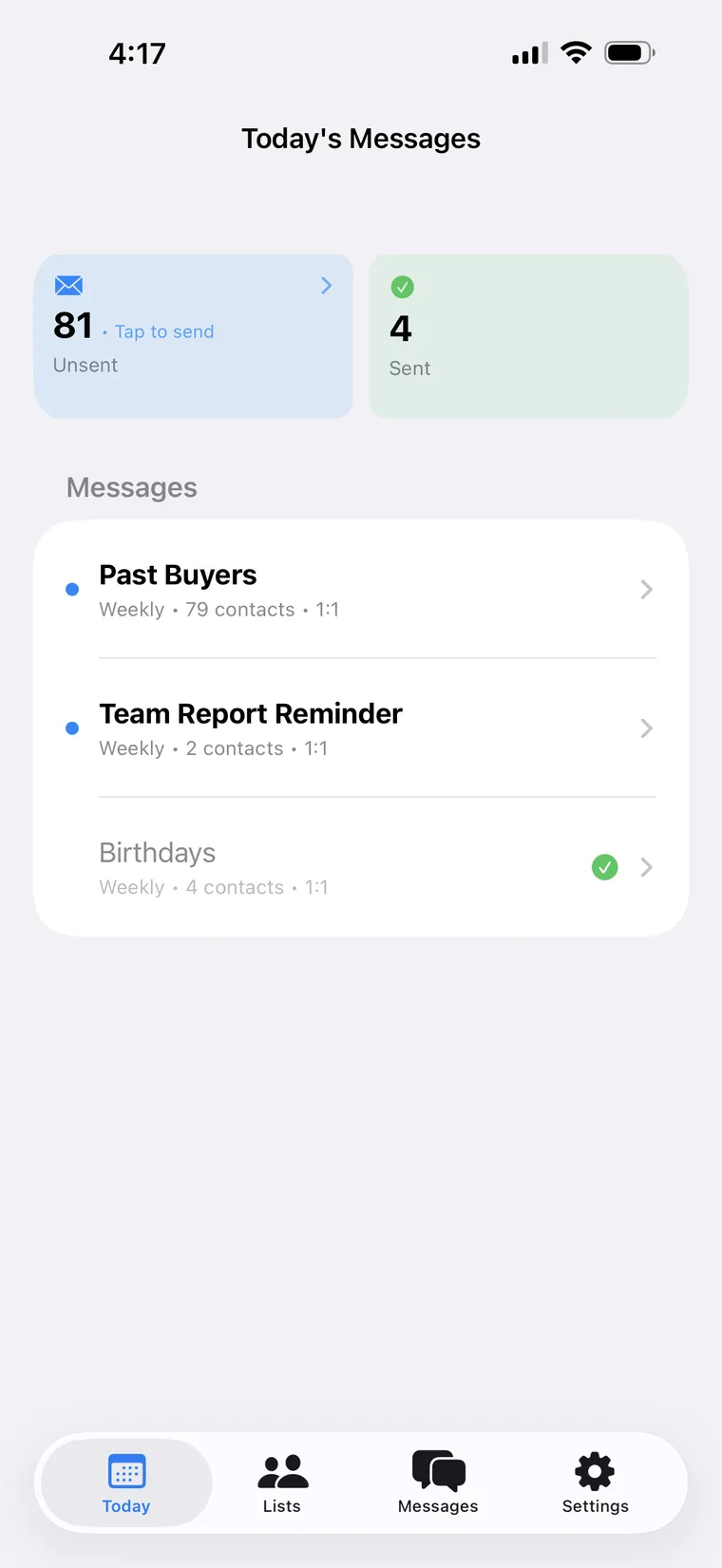
Open Taverity, review your campaigns, approve what needs a human pass, and move on in minutes.
Your message still sounds like you
Bulk SMS tools make warm relationships feel like marketing lists.
Texts are built for existing relationships and sent from your own phone number.
You keep the context warm
Buying lists, blasting strangers, and hoping people do not tune you out.
Staying in touch with people you already know, before they or their friends need help.
Getting started
See Taverity in action
A short walkthrough of how mini-campaigns work — building a list, templating a message with name tokens, and choosing what goes out automatically versus what waits for your approval.
Download and start your free week
Install Taverity on your iPhone and subscribe through the App Store. New subscribers get the first week free, then $19.99/month.
Create your lists
Group your existing contacts by relationship: past buyers, sellers, referral partners, loan clients, or service customers.
Build mini-campaigns
Choose messages, timing, and occasions. Schedule recurring check-ins, referral asks, birthdays, and anniversaries.
Approve or automate
Review messages first when you want control, or let routine follow-ups send automatically.
Product walkthrough
Mini-campaigns for the people who already know your name.
A mini-campaign is a list of contacts, a templated message (with name tokens like {first_name}), and a recurring schedule. Taverity helps you pick the moments worth reaching out and personalizes each send, and you choose whether messages go out automatically or wait for your approval.
Use your lists
Build campaigns from existing contacts and relationship groups.
Choose the timing
Schedule one-time, recurring, anniversary, and holiday follow-ups.
Review when needed
Approve sensitive messages before they leave your phone.
Automate the routine
Let trusted check-ins go out without manually typing each one.
Save the daily block
Keep your pipeline warm without living inside your messages app.
Templates with name tokens
Write once with {first_name} and Taverity personalizes each send — a 200-person birthday list still sounds like you wrote it to each one.
Moments worth a message
How sending works
From your iPhone to theirs — no Twilio-style gateway in between.
Taverity does not run a third-party SMS gateway and does not give you a separate Taverity number. Messages originate on your iPhone and arrive on your contacts' devices the same way any text you send already does.
You choose what to sync
Taverity does not pull your entire contact list. You pick the lists you want to use for campaigns, and only those contacts sync to your Taverity account.
Messages go out through Apple Shortcuts
Taverity plugs into Apple's built-in automation surface. When the shortcut runs, it pulls due messages from your account and sends them from your iPhone — your SIM, your number, your Messages app.
Review first, or run on a schedule
Open the app, review what is queued, edit or remove anything, and tap to send. Or set up an iOS Automation that runs the shortcut on a cadence — daily, hourly, whatever fits.
Outside triggers still go through you
Whether the message originates from Taverity's API, a Chrome extension reading rows in a Google Sheet, or an MCP server driven by your favorite LLM — a push notification lands on your phone. Review and edit before approving, or pre-authorize routine messages to send without prompting.
Three send modes
- 1. Review-first. Open the Taverity app, see what is queued, edit or remove anything, and tap to run the shortcut.
- 2. Scheduled. Set up an iOS Automation in the Shortcuts app to run the Taverity shortcut on a cadence — daily at 9 AM, hourly, whatever fits.
- 3. Externally triggered. Another system fires a request — Taverity's REST API, the Chrome extension that reads a Google Sheet, or an MCP server driven by your favorite LLM. The message lands on the right team member's iPhone for approval, or sends when the shortcut next runs if it was pre-authorized.
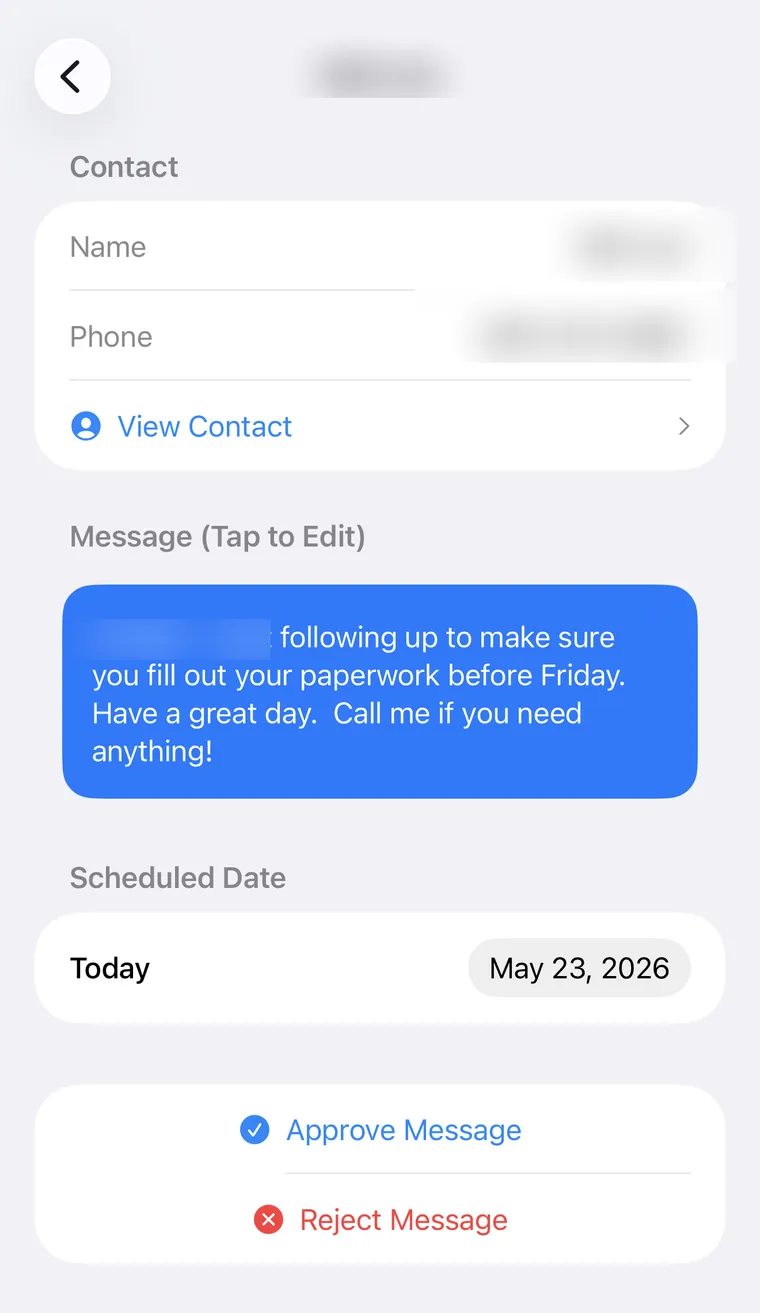
Because the send happens on your iPhone, your messages count as messages from you. Recipients see your number, replies come back to your phone, and there is no marketing infrastructure between you and the people you are texting.
Works with Claude, ChatGPT, and any MCP client
Ask your AI assistant. Approve on your phone. Sent from your number.
Taverity ships a hosted MCP server, so Claude or ChatGPT can plan and draft your follow-up for you. Describe who you want to reach and why — the assistant drafts the message, can show you exactly what will go out, and queues it to your iPhone. By default you approve it first; it sends as a normal text from your own number.
Still sends from your iPhone
The assistant only queues a message. It lands in the Taverity app and sends from your own number — no server-side sending, ever.
You approve by default
Every queued message waits for your tap by default, and the assistant can preview the exact wording with you before it queues anything.
Your contacts stay private
List members are resolved on our server, not in the model. The assistant sees list names and counts — never phone numbers.
Scoped, revocable access
Read and send are separate permissions you grant at sign-in, and you can revoke the connection any time from the Taverity portal.
No install and no token to paste — Taverity is listed in the Claude connector directory and the ChatGPT app directory, or connects to any other MCP client by URL.
Who it's for
Best for businesses where the next deal comes from being remembered.
Real estate is the clearest first market, but the same workflow fits any relationship-driven business where customers may not buy often but remember and refer the people who stay in touch.
Real estate agents
Primary marketPast buyer check-ins
Keep a light touch with buyers after the move, so you are still the person they think of when a friend asks for an agent.
Closing anniversaries
Use the home purchase anniversary as a natural reason to reconnect without sounding random.
Seller nurture
Stay visible with homeowners who are not ready yet, but may be watching the market and waiting for the right moment.
Referral partner touches
Keep lenders, inspectors, title contacts, and local partners warm without depending on memory.
Simple referral asks
Send a personal note to the right people when it makes sense to ask who they know that could use your help.
Also a strong fit for
Loan officers
Keep borrower relationships warm after closing so you are remembered for refinance and referral moments.
Insurance brokers
Stay visible with policyholders before renewal or referral windows.
Home service pros
Follow up after completed work so customers call you again when the next job comes up.
Auto dealers
Reach customers for service reminders, trade-ins, and new vehicle opportunities.
Other service providers
Keep in touch with clients for repeat business and referrals in any relationship-driven service business.
Customer story
How one agent's Easter-egg text turned into repeat business.
I paid for an Easter egg hunt in the park — candy, prizes, the whole thing. Then I pulled 250 past clients into a Google Sheet, used the Taverity Chrome extension to queue the invites, and each one went out from my own iPhone. Some I hadn't talked to in years. The turnout was great. But the real story? One client came back to refinance, and three more texted back asking if I could help a family member with a loan. The commissions from that one send will cover my Taverity subscription for years.

I'm a believer in the blue text. With Taverity and our in-house CRM, I send personal messages to clients straight from my own cell number, right through iMessage. In my first week using it I took over five refinance applications. The power of a personal text was all it took.

Taverity has been a huge time-saver. Sending template texts and reaching large groups is incredibly simple — instead of retyping the same message over and over, I stay organized, professional, and responsive in just a few clicks. It's streamlined my communication and saves me valuable time every day. Highly recommend it for anyone who regularly texts clients, teams, or large groups.

Positioning
Relationship marketing without making your contacts feel marketed to.
Taverity works because the context is already warm. It is for clients, past clients, prospects, referral partners, and people who would recognize you when your name appears.
Taverity is
Taverity is not
Not a fit if…
For teams and integrations
One API key, many users.
Team plans turn Taverity from a per-user app into a follow-up surface your existing systems can call. A single API key drives messages across multiple users' iPhones, with each message sent from the right team member's own number.
Triggered by your CRM
Use webhooks to start a follow-up when a deal closes, a listing changes status, or an anniversary lands. The message goes from the right team member's iPhone.
Transaction-system signals
Closing dates, refinance windows, and renewal moments from your back-office trigger the right follow-up to the right person at the right time.
Consistent across the team
Standardize the follow-up cadence across a brokerage or office without making messages look like they came from a marketing tool.
Bring your own integration
Webhook and REST API access. Team plans unlock single-API-key multi-user automation and are sales-led for organizations of 10+. Contact sales to scope what you want to wire in.
Pricing path
Download the app and subscribe when you are ready.
Individual users subscribe inside the iPhone app — no user cap. Larger groups can ask about team pricing when they want multi-user API automation across multiple iPhones.
Individual users
Billed monthly through the App Store
for new subscribers, then $19.99/month · cancel anytime during the free week and pay nothing
Teams and integrations
Multi-user automation through sales@taverity.com
FAQ
Questions before you start.
Is Taverity for cold outreach?+
No. Taverity is for staying in touch with people you already know, such as past clients, referral partners, prospects, and customers who would recognize your name.
Will it still feel personal?+
Yes, when used as intended: warm contacts, your own iPhone number, and messages that match the relationship. Texts arrive from your number so contacts recognize who is reaching out.
How does Taverity actually send from my number?+
Taverity dispatches messages through Apple's built-in automation (Apple Shortcuts and an App Intent that Taverity provides). When the shortcut runs — either when you tap to run it, or on a schedule you set with an iOS Automation — it pulls due messages from your account and sends them from your iPhone. There is no Taverity-owned number and no third-party SMS gateway in the loop. Recipients see your number and replies come back to your phone.
Who should I message?+
The strongest fit is a contact who has worked with you, talked with you, or would recognize your name. Use Taverity for relationship-based communication with existing contacts, not purchased lists or strangers.
Does Taverity replace my CRM?+
No. Taverity is not positioned as a CRM replacement. It is focused on helping you create, schedule, approve, and send personal follow-up texts.
What types of businesses use Taverity?+
Real estate is an important early use case, but the same workflow can help loan officers, insurance brokers, home service pros, auto dealers, and other referral-driven service businesses.
Can I approve messages before they send?+
Yes. You can review messages first when you want control, or automate routine follow-ups when that makes sense.
Does Taverity work on Android?+
Taverity is currently built for iPhone.
How do I subscribe?+
Download Taverity from the Apple App Store and subscribe inside the app. New subscribers get the first week free, then $19.99/month.
How much does Taverity cost?+
Taverity is $19.99 per month per user, billed through the Apple App Store. New subscribers get the first week free — cancel during the free week and you pay nothing. Team pricing, which unlocks multi-user API automation across multiple iPhones, is available for organizations of 10+ through sales@taverity.com.
How is the team plan different from individual subscriptions?+
Both plans let you build campaigns and send from your own iPhone number. Team plans add a single API key that drives follow-ups across multiple users' iPhones, which is useful for brokerages, offices, or anyone wiring Taverity into a CRM or back-office system.
Do you offer team pricing?+
Yes. Team pricing unlocks single-API-key multi-user automation across multiple iPhones and is sales-led for organizations of 10+ through sales@taverity.com.
Can I use Taverity with Claude or ChatGPT?+
Yes. Taverity ships a hosted MCP (Model Context Protocol) server, so any MCP-capable assistant — Claude, ChatGPT, and others — can draft and queue follow-ups for you. The assistant can preview exactly what will be sent, then queues it to your iPhone; by default it waits for your approval, and it always sends from your own number. Your contacts' phone numbers never enter the assistant's context. Setup instructions are at https://taverity.com/docs/mcp.
Can messages be triggered automatically?+
Yes. In addition to app-based campaigns, Taverity supports API and webhook-triggered automation. A public overview is at https://taverity.com/docs/api; the full reference is included with team-plan onboarding.
How much time will Taverity save me?+
We don't claim a specific number. Agents who try to keep up with past-client follow-up manually often estimate around 30 minutes a day, and the habit usually slips. Taverity is built so the daily routine takes a few minutes of review — or runs on a schedule without you typing each one. Actual time depends on your list sizes, how many messages you write yourself, and whether you review-first or run on a cadence.
Start today
Build your first follow-up campaign before another referral slips by.
Download the iPhone app, create your first list, and start sending relationship-first follow-ups. New subscribers get the first week free, then $19.99/month.
1 week free for new subscribers, then $19.99/month. Cancel anytime during the free week.